Let a script read and write HQ
One key per script — a scraper, an inbox sorter, a cron job — through plain HTTP. Where to make it, what it may touch, and how to take it back.
Updated
2 min read
HQ is where the data lives, not where the work is done. A lead finder, a script that sorts your inbox, a nightly job — those run on their own and write the result into HQ, signed with the name of their key.
Connecting Claude, Claude Code, Cursor or VS Code? You don't need a key. Press Connect to Claude in Settings → API & MCP and approve the sign-in page: Connect HQNote to Claude. This page is for scripts that can't sign in through a browser.
Where the setting lives
Settings → API & MCP.
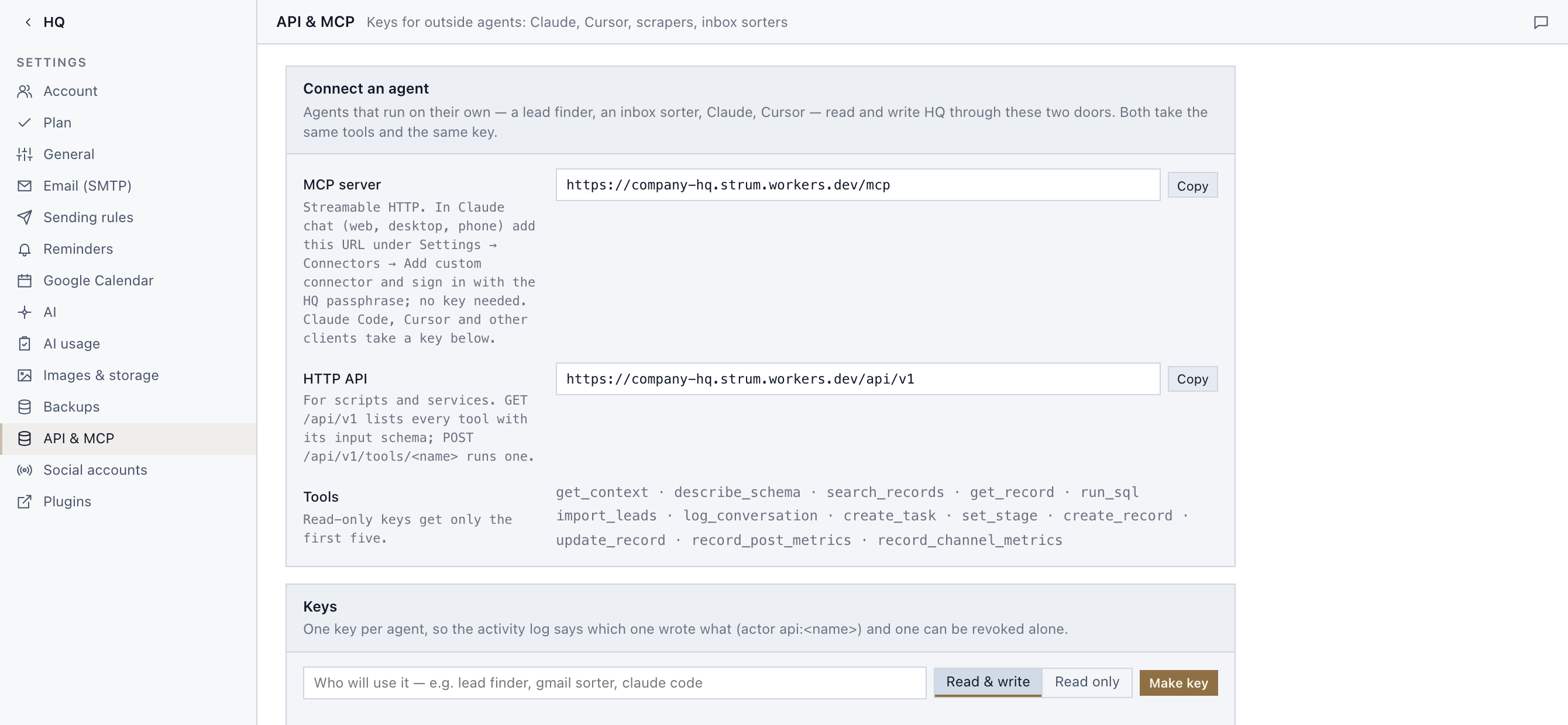
| Door | Address | For |
|---|---|---|
| HTTP | https://api.hqnote.app/v1 |
A scraper, a cron job, Zapier — anything that can send a request |
| MCP (Streamable HTTP) | https://mcp.hqnote.app |
An MCP client that can't do OAuth sign-in |
Make one key per agent
Type which script will use it, choose the access, press Make key. The name is not decoration: every row
that agent writes is logged as api:<name>, so you can see what the lead finder did and revoke it
alone without touching anything else.
| Access | Tools it gets |
|---|---|
| Read only | get_context · describe_schema · search_records · get_record · run_sql |
| Read & write | those, plus import_leads · log_conversation · create_task · set_stage · create_record · update_record · record_post_metrics · record_channel_metrics |
A read-only key does not merely get refused when it tries to write — the writing tools are not offered to it at all.
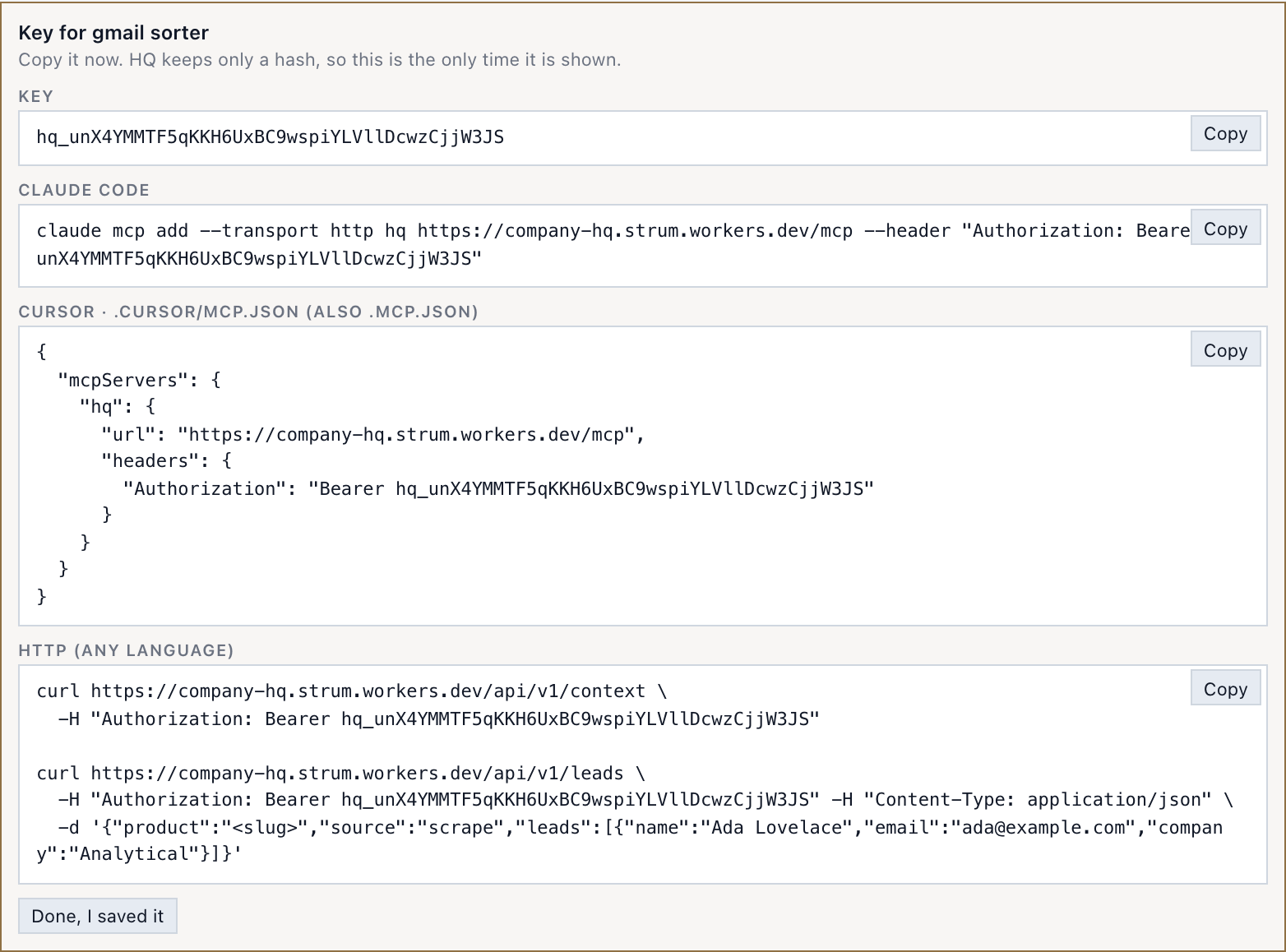
HQ keeps only a hash of the key. If you lose it, nothing is lost but the key itself: revoke it and make another.
Use it
The reveal panel writes the request for you, key included. One header, plain HTTP:
curl https://api.hqnote.app/v1/context \
  -H "Authorization: Bearer hq_…"

curl https://api.hqnote.app/v1/leads \
  -H "Authorization: Bearer hq_…" -H "Content-Type: application/json" \
  -d '{"product":"<slug>","source":"scrape",
       "leads":[{"name":"Ada Lovelace","email":"ada@example.com","company":"Analytical"}]}'
GET /api/v1 lists every tool with its input schema, and POST /api/v1/tools/<name> runs one, so
an agent can discover what it may do without being told.
How an agent should use it
The same two rules the AI panel follows:
- Call
get_contextfirst. It answers today's date in HQ's timezone, the product and channel ids, and the values each field accepts. Guessing an id is how duplicates get made. - Search before writing.
search_recordsfirst; then the most specific tool for the job —import_leadsfor a list of leads,log_conversationfor messages with one person,create_taskfor a follow-up,set_stagefor the pipeline,create_record/update_recordfor anything else.
Email addresses and handles are unique, so the same value means the same person: import_leads
merges into whoever is already there and fills only the empty fields.
Watching and revoking

- Recent calls under the key list shows the last 100 calls: which key, which tool, how long, and the error if it failed.
- Every write lands in the activity log as
actor = api:<name>, next to your own edits and the AI panel's. - Revoke takes effect immediately. What that agent already wrote stays — revoking a key is not an undo.
Treat a read & write key like a password to your company's records. It goes in the agent's own secret store or environment, never in a repository, a chat message or a screenshot.